How it worksChits & daily financeFeaturesPricingSecurityFAQ Get the app
New Now on Android · iPhone coming soon

Every rupee you
share,split,lend,collect, settled.

Extraby is one calm place for everyday money: split bills and see who has paid, snap receipts from any payment app, run chit groups and daily-finance rounds, and keep every document safe.

Free plan, no card 22 Indian languages Face ID & fingerprint lock
✈Goa trip with friends ⌂Flat 402 rent & bills ◎Kukatpally 5 lakh chit ⟳Daily collection round ♥Family monthly budget ▤House construction site ₹Khata with the kirana shop ⚑Office team lunches ▣Warranties & IDs ◷EMIs and credit-card dues
How it works

Real screens. Three steps each.

Pick a feature to see exactly how it works in the app. Every screen below is the real Extraby app.

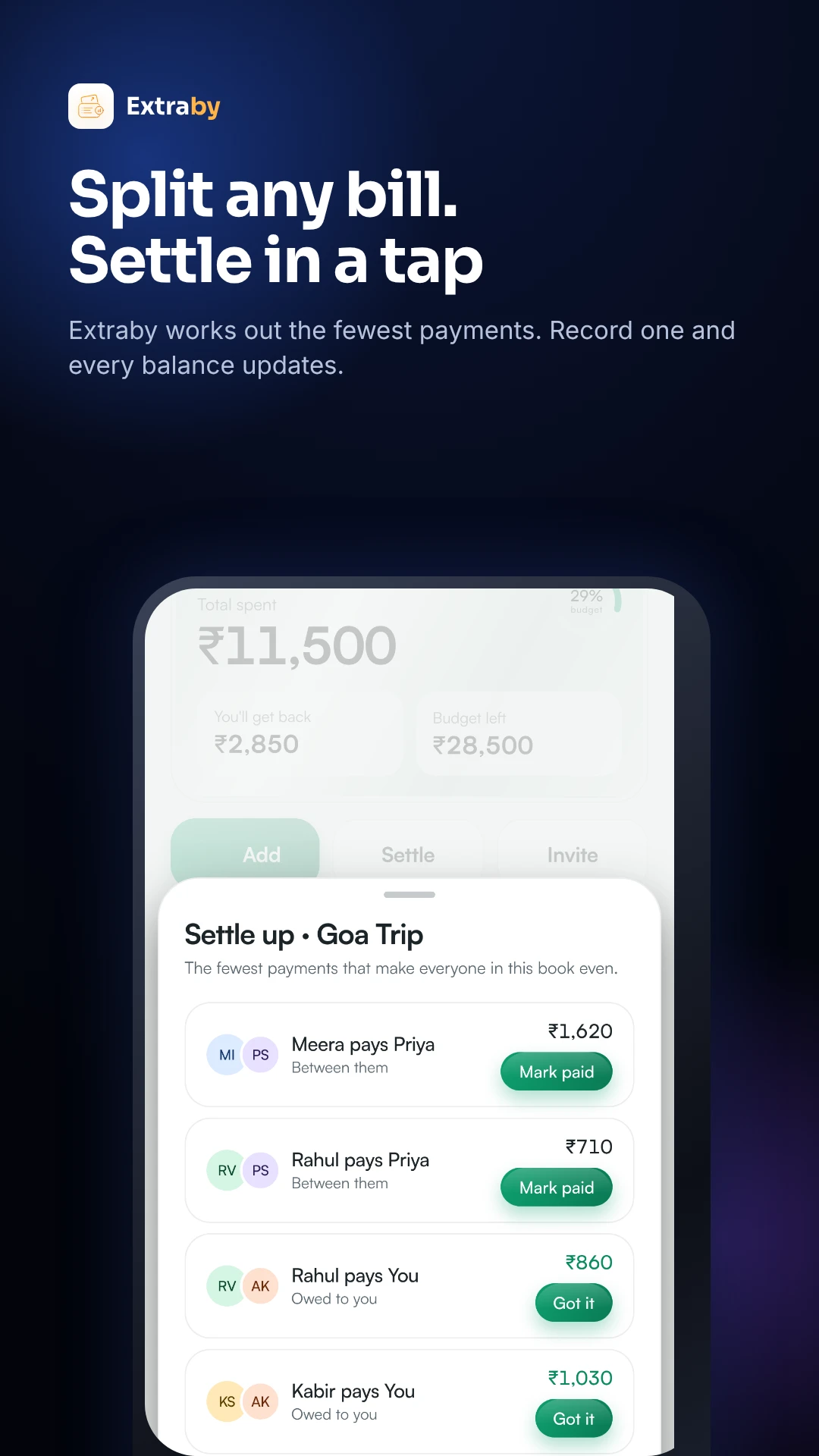
Settle up screen showing the fewest payments and Mark paid

Split any bill. Settle in a tap.

No more mental maths or awkward reminders. Everyone sees their share the moment it is added.

  1. 1
    Add what was spentType it, speak it, or share a receipt. Choose who paid.
  2. 2
    Pick who is in and how to splitEqually, by exact amounts, or by percentage. Shares are worked out for you.
  3. 3
    Settle upExtraby shows the fewest payments to clear everyone. Pay by UPI or cash, tap Mark paid, and every balance updates.
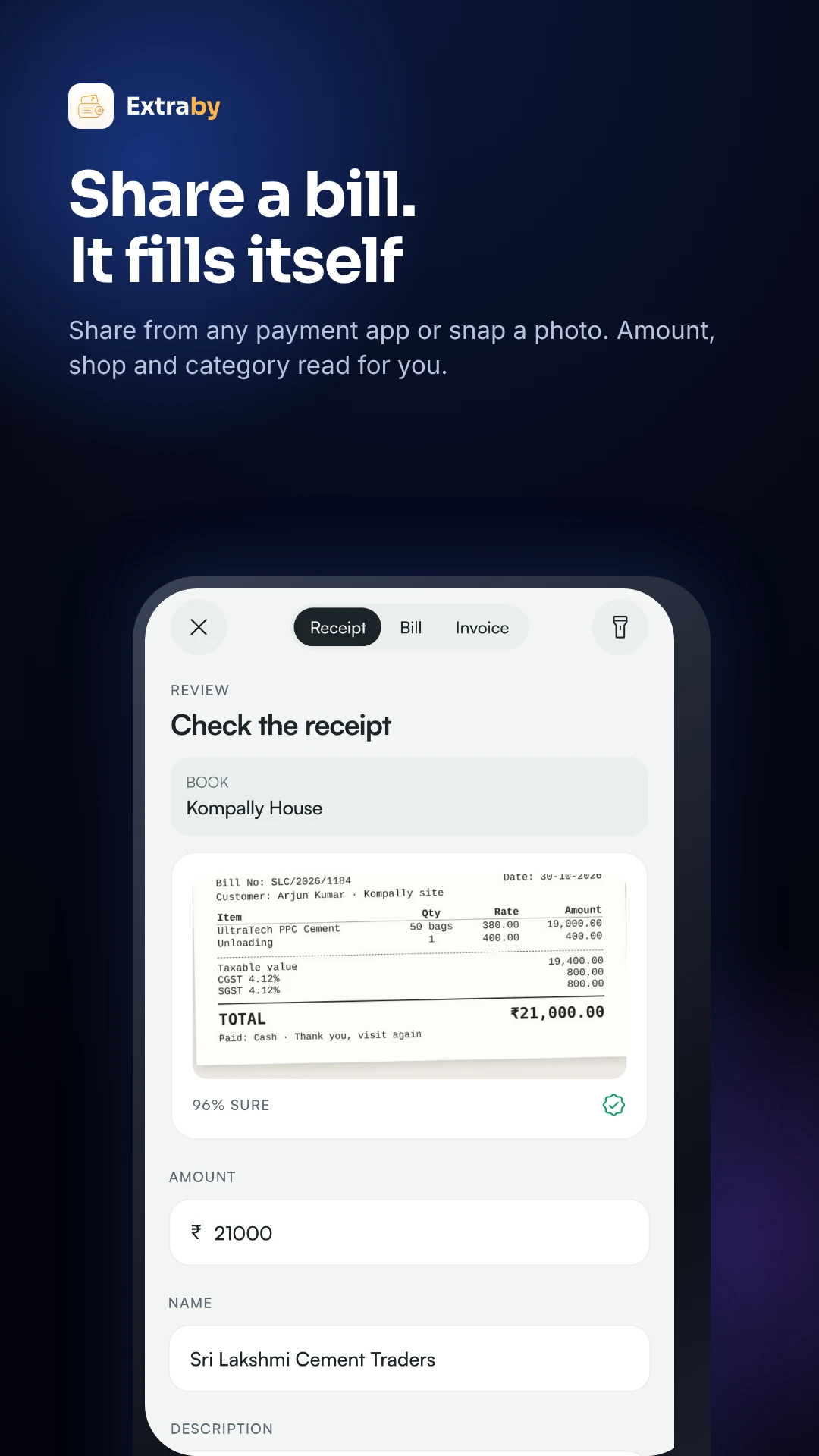
Receipt review with amount and shop read from a photo

Share a receipt. It fills itself.

Works with GPay, PhonePe, Paytm, bank apps, Swiggy, Amazon and photos of paper bills.

  1. 1
    Share or snapTap Share on any payment screenshot and pick Extraby, or take a photo of the bill.
  2. 2
    Extraby reads itAmount, date, shop, category and tax are read for you, even from Indian invoices with GST.
  3. 3
    Check and saveChoose the book, fix anything in a tap, and save. The receipt stays attached to the entry.
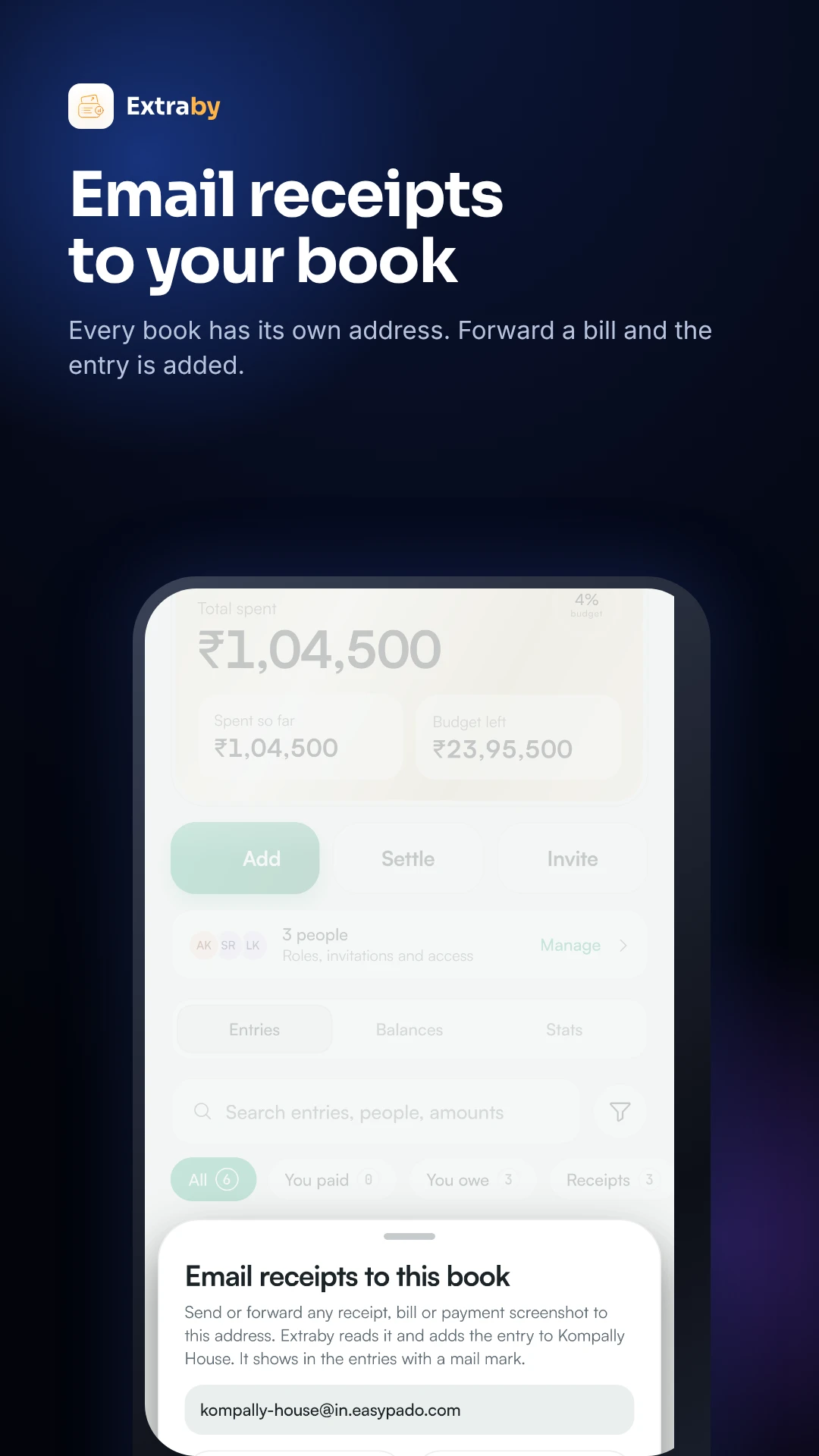
A book's own email address for forwarding receipts

Forward a bill. The entry appears.

Electricity bills, invoices and order mails go straight into the right book.

  1. 1
    Copy your book's addressEvery book gets its own private email address in Extraby.
  2. 2
    Forward the mailFrom Gmail or any app, forward the bill or invoice with its PDF.
  3. 3
    It is added for youThe amount and details are read and the entry shows up in the book, PDF attached.
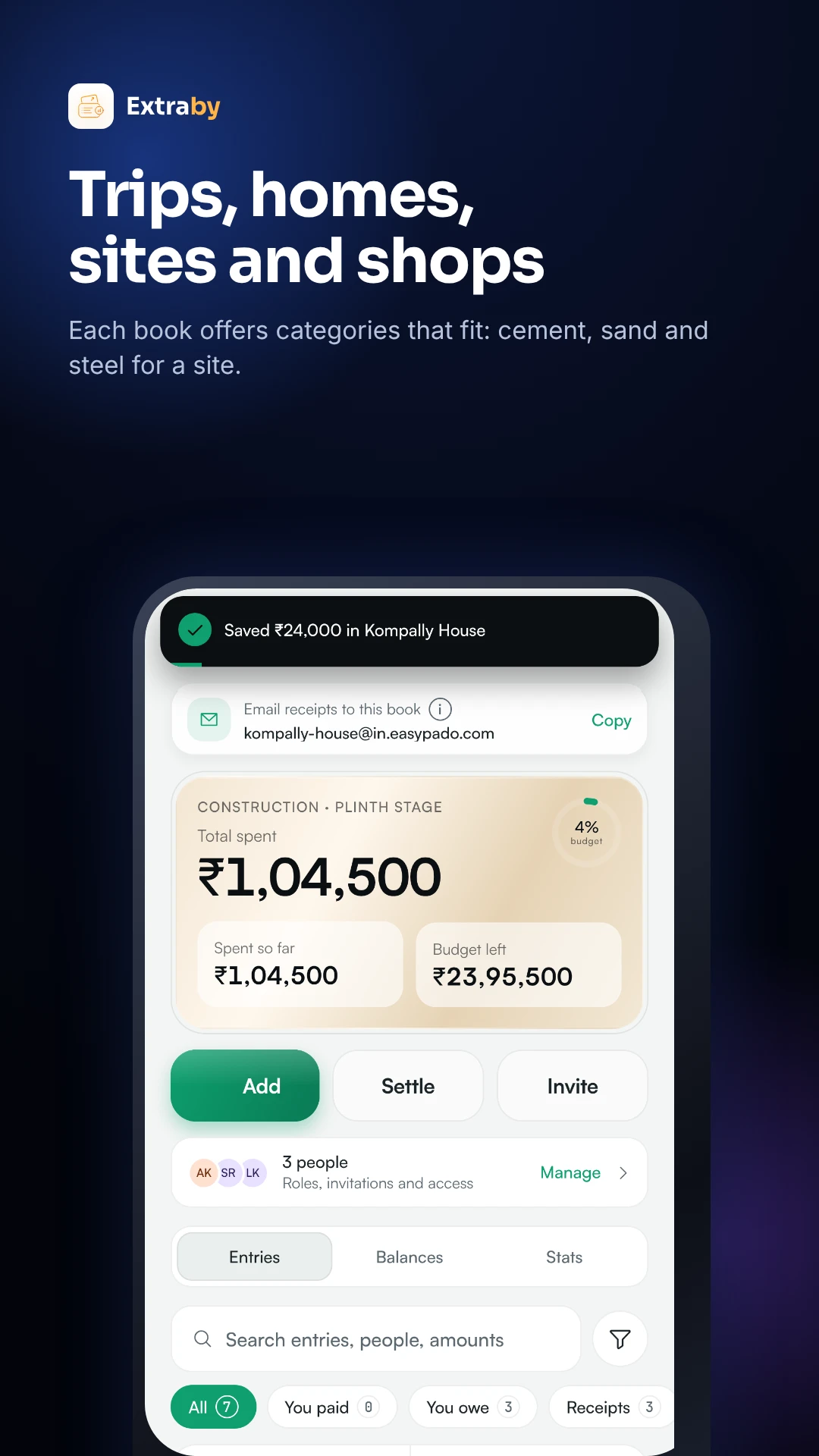
A construction book with budget and entries

A book for every part of life.

A trip, a flat, a building site, a shop or a team: each has its own entries, people and categories.

  1. 1
    Create a bookPick a type and get categories that fit, like cement, sand and steel for a site.
  2. 2
    Invite people and set rolesDecide who can add, edit or only view, person by person.
  3. 3
    Everyone stays in syncEach entry shows who added or changed it. Budgets, reports and PDF or Excel exports are one tap away.
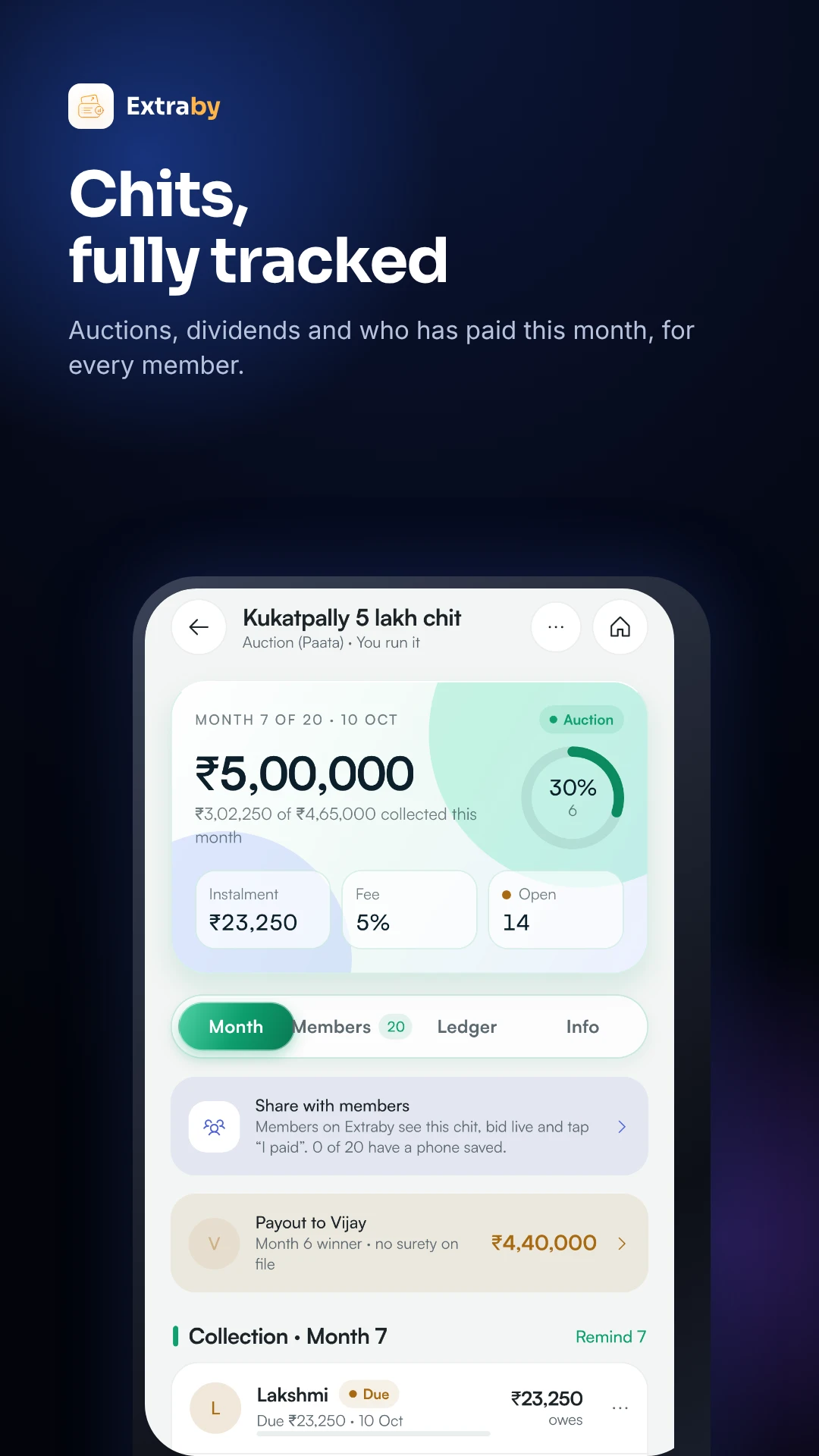
Chit fund: month 7 of 20, instalment, fee and payout

Run a chit without a notebook.

Members, monthly instalments, auctions, dividends and payouts, tracked for every month.

  1. 1
    Set up the chitChit value, number of members and months, foreman fee and auction day.
  2. 2
    Run the monthly auctionRecord the winning bid. Extraby works out the payout, each member's dividend and this month's instalment.
  3. 3
    Collect and remindSee who has paid this month, send reminders, and members on Extraby can tap “I paid”.
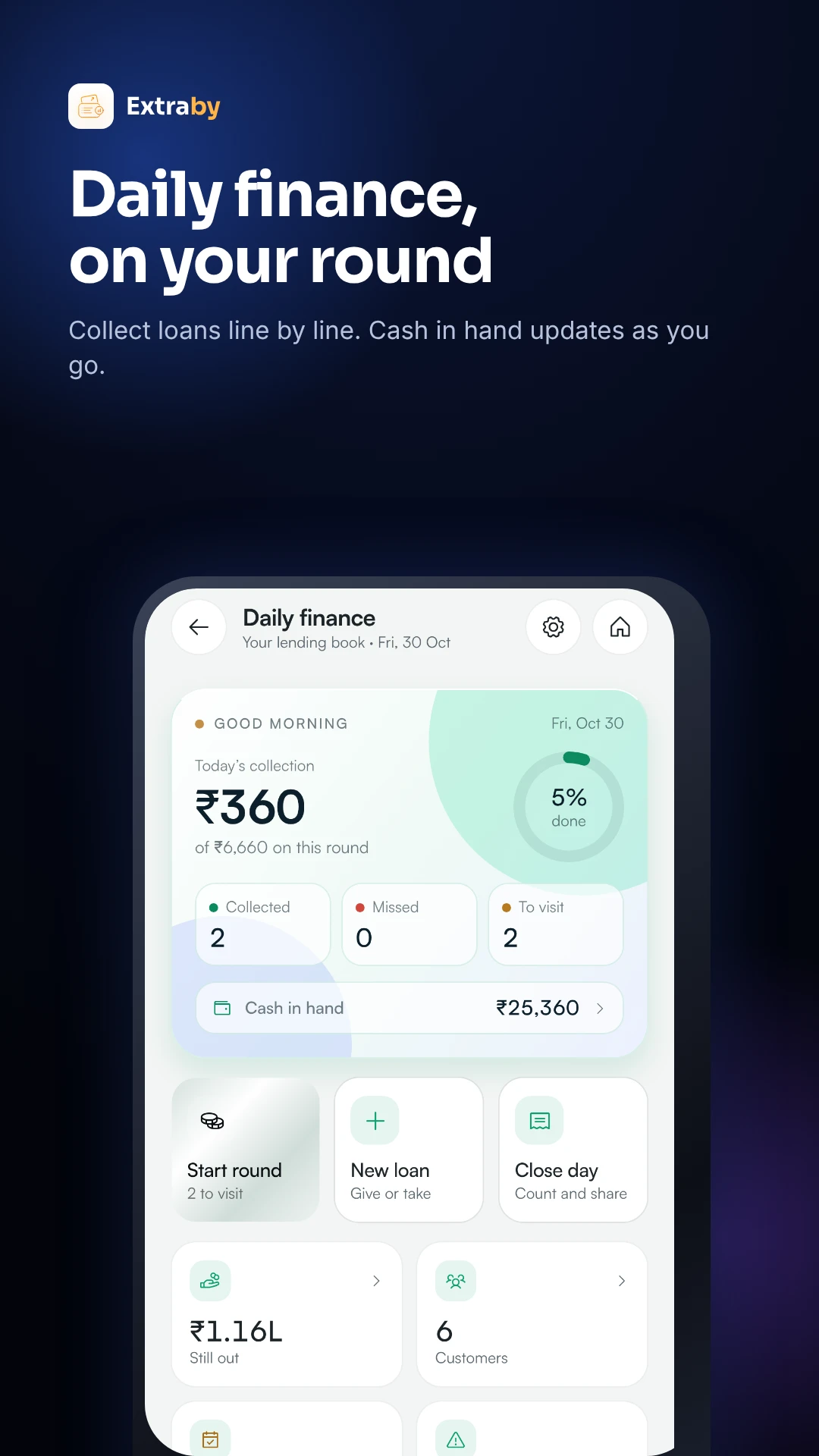
Daily finance: today's collection, collected, missed and to visit

Daily finance, on your round.

For daily and weekly lending: every customer, every collection and the cash in your hand.

  1. 1
    Give a loanAmount, money in hand, daily or weekly instalment, days, and the customer's line.
  2. 2
    Start your roundGo customer by customer and tap Collected or Missed. Cash in hand updates as you go.
  3. 3
    Close the daySee collected, missed and still out, then share the day's summary.
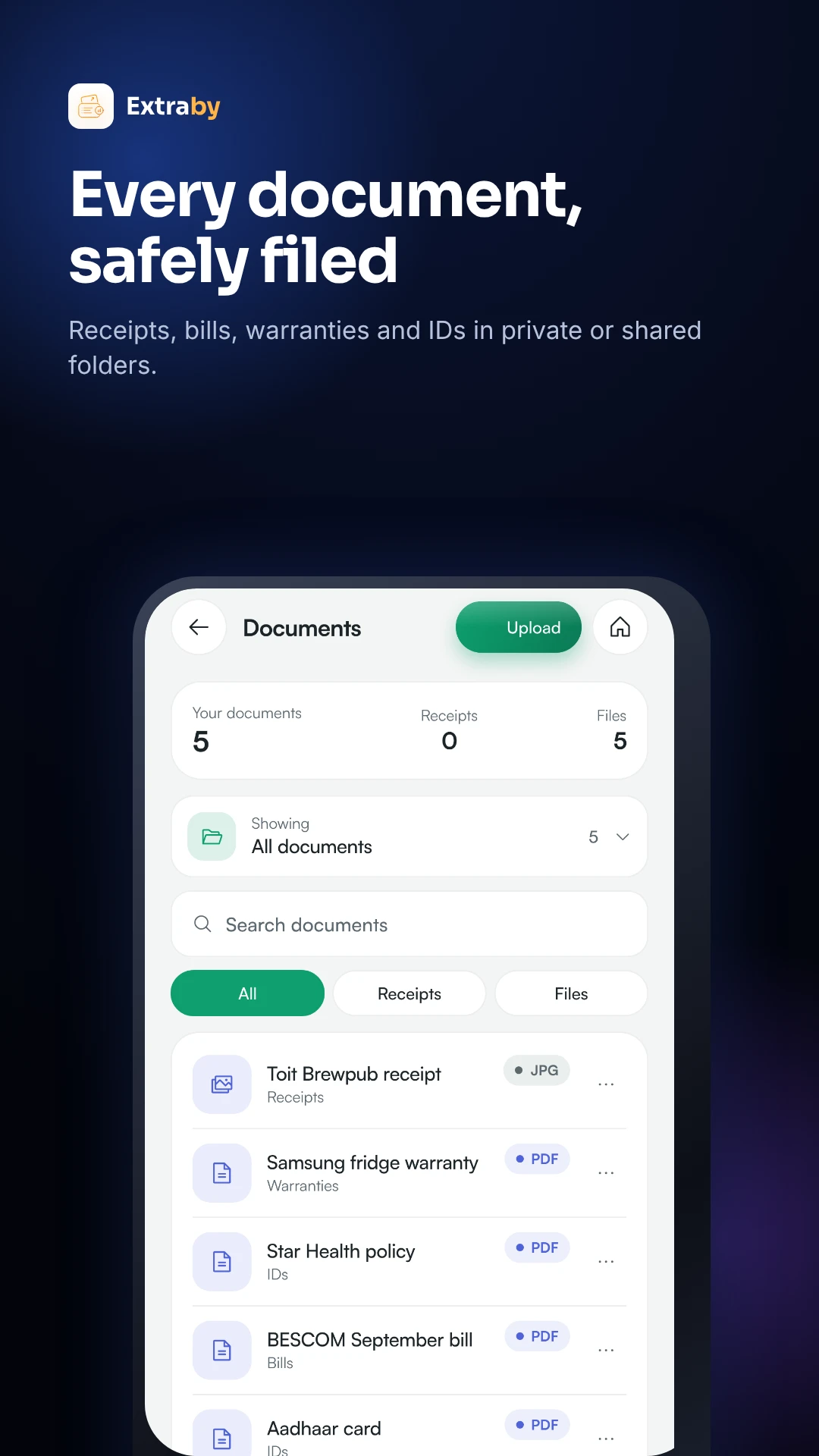
Documents: receipts, warranties and IDs in folders

Every document, safely filed.

Bills, warranties, rent agreements and IDs, found in seconds when you need them.

  1. 1
    Add from camera or filesPhotos and PDFs, straight from your phone.
  2. 2
    Private or shared foldersKeep some to yourself and share others with family or a book.
  3. 3
    Find it fastReceipts stay linked to their entries, so the proof is always next to the spend.
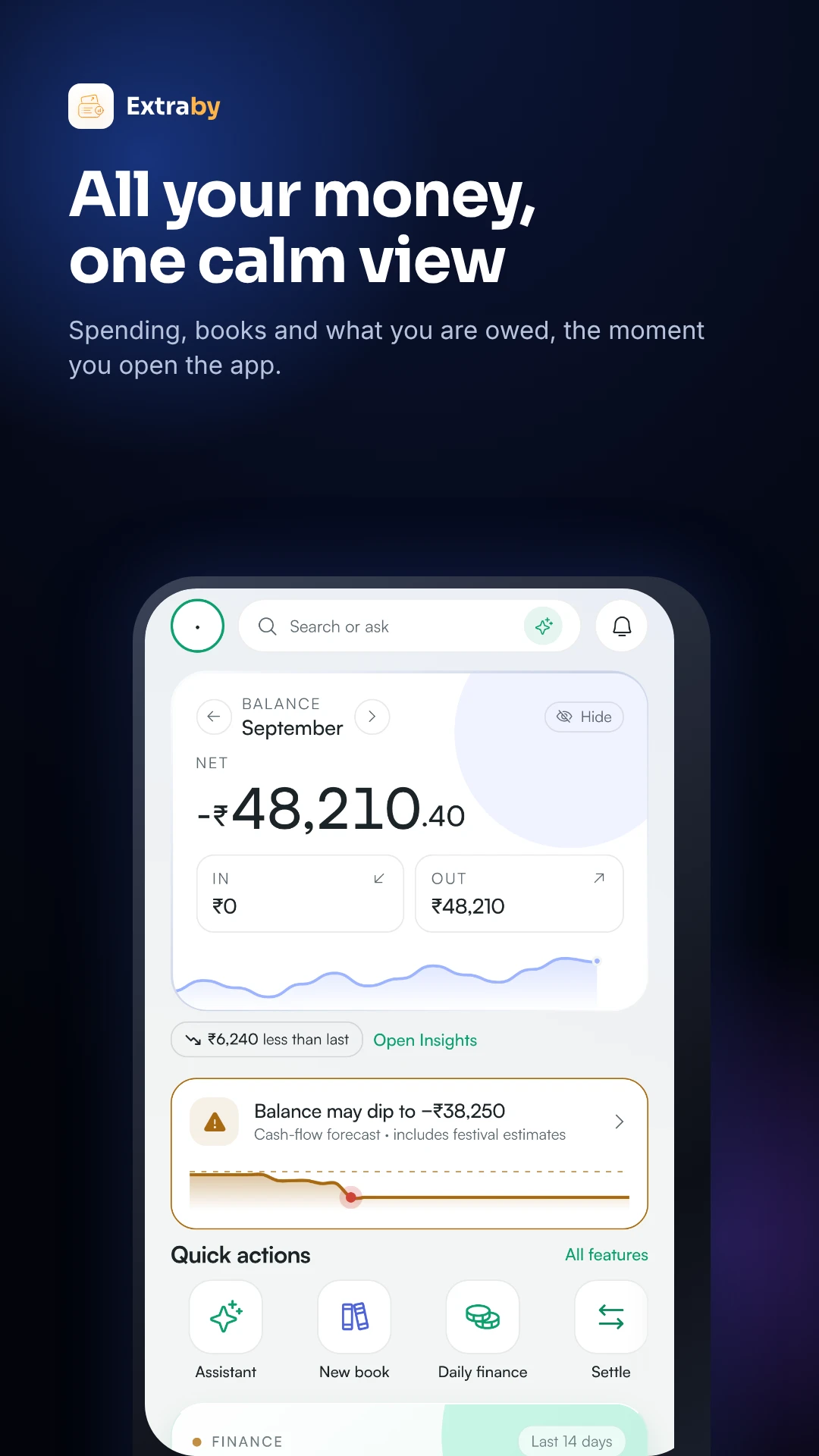
Home: balance, money in and out, forecast and quick actions

All your money, one calm view.

Open the app and know where you stand in two seconds.

  1. 1
    Balance and money in or outThis month's spending, income and what you are owed, across every book.
  2. 2
    See what is comingEMIs, card dues, chit instalments and reminders, before they are due.
  3. 3
    One tap to actAdd, scan, split or settle straight from Home.
Chits & daily finance

See the maths before you run it.

Move the sliders. This is the same calculation the app does for you every month and every round.

The member who takes the money this month gives up this much.

Winner receives this month
₹4,40,000
7/20
Each member pays₹23,250
Dividend each₹1,750
Foreman fee₹25,000
The full instalment is ₹25,000. The ₹60,000 bid minus the ₹25,000 fee leaves ₹35,000, shared as a ₹1,750 dividend, so everyone pays ₹23,250 this month.

Upfront interest kept back when you give the loan (here 10%).

Still to collect
₹6,000
40%
Daily instalment₹100
Collected₹4,000
You earn₹1,000
You hand over ₹9,000 and collect ₹100 a day for 100 days. With 3 missed days, the last collection moves 3 days later.
◎Live chit auctionsMembers on Extraby can see the chit and bid live from their phones.
⟳Lines and agentsSplit customers into lines and rounds, with an agent for each.
☏Reminders that landSend due reminders by WhatsApp or notification in one tap.
⇩Reports for your recordsExport collections, dues and payouts to PDF or Excel.
Try it here

Split a dinner. Right now.

Pick who was there, then mark people as paid. This is how a book feels. Nothing on this page is saved.

Tip: tap a name on the right to mark their share as paid.

Everything else

Small things that save hours.

🎙

Speak an expense

Say it the way you would tell a friend. Extraby writes the entry.

“Two hundred for auto to office” → ₹200 · Travel
₹

Khata for people and shops

Keep a running account with anyone: who gave, who got, and the balance. Send a reminder with the amount in one tap.

◷

Loans & EMIs

Track every EMI, what is left and the next due date, for loans you took and money you lent.

▭

Credit cards

Statement dates, dues and minimums for each card, so nothing turns into a late fee.

⇩

Reports & exports

Where the money went by month and category. Export any book to PDF or Excel.

अ

22 Indian languages

Use the app in the language you think in.

Englishहिन्दीతెలుగుதமிழ்ಕನ್ನಡमराठीবাংলাગુજરાતીമലയാളംਪੰਜਾਬੀଓଡ଼ିଆاردو+10 more
☁

Works without signal

Add entries on a site or a bus with no network. They are kept on your phone and sent the moment you are back online.

Pricing

Start free. Upgrade when you outgrow it.

Every feature is on every plan. Bigger plans lift the limits.

Free

Everything included, with friendly limits.

₹0 forever
No card needed
  • Unlimited entries and receipt scans
  • 10 books, 5 people in each
  • 50 uploads a month, 500 MB storage
  • Chits, daily finance, khata, loans and cards
  • 1 phone
Get started
Most popular

Base

For one busy person or a household.

₹20 / month
+ GST · billed monthly
  • Unlimited entries and receipt scans
  • 25 books, 25 people in each
  • 100 uploads a month, 2 GB storage
  • 300 khata people, 25 chit groups
  • 3 phones · priority support
Choose Base

Pro

For teams, trips and lenders.

₹99 / month
+ GST · billed monthly
  • Unlimited uploads, exports and invites
  • 100 books, 100 people in each
  • 20 GB storage
  • 1,000 daily-finance customers
  • 5 phones · priority support
Choose Pro

Plans are bought inside the app. In India on Android and the web: UPI, card or netbanking through Razorpay, with autopay or pay once. Outside India on Android: Google Play. On iPhone: the App Store, at App Store prices. The price shown in the app before you pay is the one that applies. Full pricing

Security

Your money data, handled carefully.

What we do today, stated plainly.

🔒
App lockLock Extraby behind Face ID, fingerprint or your phone PIN.
✉
Two-step sign-inTurn on a code by email for every new sign-in.
⛨
Encrypted in transitEverything between the app and our servers travels over HTTPS.
👥
Roles per bookDecide who can add, edit or only view, person by person.
⎘
Backed up every dayA second copy of your files, and your data can be restored to any point in the last 7 days.
₹
We never see your card or PINPayments run on Razorpay, Google Play or the App Store. We do not sell your data.
Get the app

Your books, in your pocket.

Choose your phone.

GET IT ONGoogle Play

Free to download, with a free plan inside. No card needed.

COMING SOON ON THEApp Store

The iPhone app is finished and on its way through Apple's review. This button will open the App Store as soon as it is live.

Scan with your Android phone
Questions

Asked, answered.

Is Extraby free?+

Yes. The Free plan includes every feature with monthly limits, and needs no card. Base (₹20 a month) and Pro (₹99 a month) lift the limits, plus GST.

Is there an iPhone app?+

Yes, it is in Apple's review now and will be on the App Store soon. The Android app is on Google Play.

Does Extraby hold or move my money?+

No. Extraby is a record of who owes what. You pay each other by UPI or cash as you always do, then mark the share as paid.

Do the people I split with need the app?+

To see their share and get notified, yes: invite them to the book. You can still add expenses for people before they join.

How do chits work in Extraby?+

Set the chit value, members, months and foreman fee. Each month you record the auction winner and bid; Extraby works out the payout, every member's dividend and instalment, and tracks who has paid.

Who is daily finance for?+

Anyone who lends daily or weekly and collects on a round. You add loans and customers, mark each collection as you go, and see cash in hand and what is still out.

Which languages does the app support?+

22 Indian languages, including Hindi, Telugu, Tamil, Kannada, Marathi, Bengali, Gujarati, Malayalam, Punjabi, Odia and Urdu, plus English.

How do I delete my account or get help?+

Use Delete your account, or email byjanbooks@gmail.com. We reply within two working days.